
- Company
- Press Center
- Different Types of SSD Form Factors: 2.5", M.2, mSATA, and More
BLOG
2026.07.01
Different Types of SSD Form Factors: 2.5", M.2, mSATA, and More
SHARE
Selecting an SSD involves more than comparing speed and capacity. Many compatibility issues arise when SSD form factors are overlooked, resulting in drives that do not fit the system or deliver expected performance. From widely used SATA SSDs to compact, high-performance M.2 SSDs, these form factors are designed for specific hardware and application requirements. Understanding these distinctions is essential for making the right choice. Follow us in this guide as we explore the main types, also small form factor SSDs (mSATA and M.2), and help you determine the most suitable option for your system.
What Is an SSD Form Factor and Why Does It Matter?
A Solid-State Drive (SSD) is a storage device that uses non-volatile NAND flash memory to store data. Unlike traditional hard disk drives (HDDs), SSDs have no moving parts like the read-and-write head, making them significantly faster, more durable, and more energy-efficient.Within this context, an SSD's form factor refers to its standardized physical size, shape, and connection design, which determines how the drive fits and integrates into a system. This includes not only its dimensions, but also how it connects to the motherboard or backplane.
Understanding these is essential because they directly impact how a storage device can be deployed and how well it performs in a given environment. The importance of SSD form factors can be understood from several key aspects:
-
Compatibility: The correct form factor ensures that the SSD physically fits into the target system. For instance, 2.5" SSDs are widely used in desktops and older laptops, while the compact M.2 form factor is designed for space-constrained devices such as embedded computers and modern motherboards.
-
Performance: Different form factors support different interfaces, which directly affect data transfer speeds. While many 2.5” drives rely on the SATA interface, newer and more compact designs like M.2, U.2, and PCIe add-in cards support NVMe, enabling significantly higher performance for demanding workloads. Read our guide here if you want to know more about NVMe and SATA.
-
Thermal Efficiency: The physical design of an SSD also influences system cooling and airflow. Cable-free solutions such as M.2 can help streamline internal layouts, while enterprise-focused designs like EDSFF (E1.S) are engineered to optimize airflow, heat dissipation, and scalability in high-density environments.
Looking ahead, SSD form factors are evolving toward greater miniaturization, improved thermal design, and higher integration efficiency. As storage demands continue to grow across consumer, industrial, and enterprise applications, newer form factors are being developed to support higher performance while simplifying system design and deployment.
Different Types of SSD Form Factors
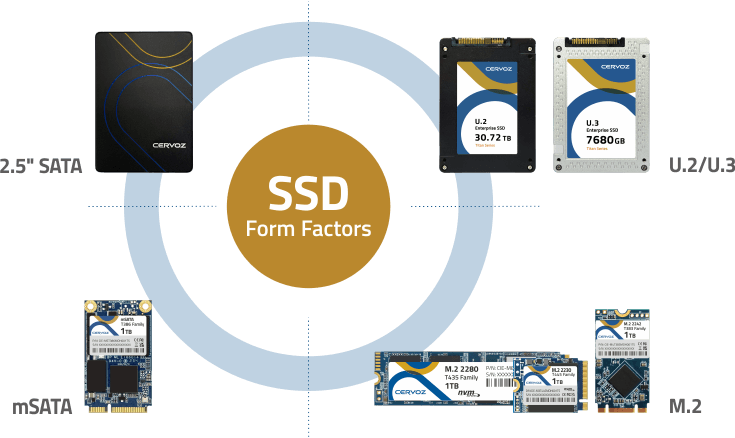
SSD form factors come in a variety of designs, each developed to meet specific system requirements and use cases. In the following sections, we will first examine the commonly used form factors found in desktops, laptops, and embedded systems, before moving on to enterprise-oriented designs.2.5" SATA SSD
The 2.5" SATA SSD is one of the most widely adopted and recognizable SSD form factors, originally designed as a direct replacement for traditional hard disk drives (HDDs). Its standardized dimensions allow it to fit seamlessly into existing drive bays in desktops and older laptops, making it a highly practical upgrade option.These drives connect through the SATA interface, typically SATA III, which offers reliable performance for everyday computing tasks, though it is limited in bandwidth and speed compared to newer NVMe-based solutions. Because installation requires both power and data cables, the 2.5" form factor is more common in systems where internal space is less constrained.
mSATA SSD
The mSATA SSD was introduced as a compact alternative to the 2.5" form factor, targeting devices where space efficiency is essential. Significantly smaller in size, mSATA modules were widely used in early ultrabooks and tablets. Despite its smaller footprint, mSATA operates using the SATA interface, meaning its performance is similar to that of 2.5" SATA SSDs.Although it uses a connector that resembles Mini-PCIe, it is not interchangeable at the electrical level with standard PCIe devices. Over time, mSATA has been largely phased out in favor of the more flexible M.2 form factor.
M.2 SSD (Size: 2230/2242/2280)
The M.2 SSD is a modern, compact form factor designed to meet the needs of today’s high-performance and space-constrained systems. Its slim, rectangular design allows it to be installed directly onto the motherboard via an M.2 slot, eliminating the need for cables and simplifying system layout.One of the key advantages of M.2 is its interface flexibility. Depending on the configuration, an M.2 SSD can support either the SATA interface or the much faster PCIe interface using NVMe protocol. As a result, performance can vary significantly even within the same form factor.
M.2 SSDs are also defined by their physical dimensions, with a standard width of 22 mm and varying lengths. Here are the common types:
-
2230 (22mm x 30mm): Used in handheld devices and compact laptops
-
2242 (22mm x 42mm): Found in small form factor systems and business laptops
-
2280 (22mm x 80mm): The most common size, widely used in high-performance laptops and edge computing
| Form Factor | Physical Design | Interface Support | Installation Method | Key Advantage |
|---|---|---|---|---|
| 2.5” SATA SSD | Standard drive bay size | SATA (up to 6Gb/s) | Cable (power + data) + mounting | High compatibility, easy replacement |
| mSATA SSD | Compact card (Mini-PCIe-like) | SATA (up to 6Gb/s) | Slot-based (Mini-PCIe connector) | Smaller size than 2.5” |
| M.2 SSD | Slim, stick-like module | SATA or PCIe (NVMe) | Direct motherboard slot | High performance, space-efficient |
*Find out more information about the differences between mSATA and M.2 in our other article!
Beyond mainstream SSDs, enterprise and data center environments require storage solutions built for continuous operation, scalability, and high-performance workloads. These form factors are designed not only for speed but also for serviceability, such as hot-swapping, and for handling demanding applications. As a result, their designs place strong emphasis on thermal efficiency, interface bandwidth, and system integration.
U.2 SSD & U.3 SSD
U.2 SSDs are designed in a familiar 2.5" drive format, but use a specialized connector to support the high-speed PCIe NVMe interface. This allows them to combine the physical accessibility of traditional drives with significantly improved performance. A key advantage of U.2 is its hot-swappable capability, enabling drives to be replaced or upgraded without shutting down the system, which is essential in enterprise environments where uptime is critical.The U.3 standard builds on this design by introducing tri-mode support, allowing a single backplane to accommodate SATA, SAS, and NVMe drives. This improves flexibility in storage infrastructure and simplifies system design. While U.3 drives are generally backward compatible with U.2 systems, the reverse is not always supported, making forward compatibility an important consideration when designing or upgrading enterprise systems.
Enterprise & Datacenter SSD Form Factors (EDSFF)
EDSFF is a newer family of SSD form factors developed specifically to address the growing demands of modern data centers, particularly in terms of storage density, thermal management, and power efficiency. Unlike legacy designs, EDSFF focuses on optimizing airflow and maximizing capacity within server environments.The E1 series is typically used in 1U servers, where space is limited but performance requirements remain high. The E1.S format is slightly larger than M.2, allowing for greater NAND capacity and improved heat dissipation, while the E1.L format, often referred to as the "ruler" design, extends the length of the drive to support extremely high storage densities. For larger systems, the E3 series is designed for 2U and above servers, offering wider form factors that can support higher power levels and PCIe x16 connections.
Add-in Card (AIC)
Add-in Card (AIC) SSDs use a PCIe expansion card format, similar to a graphics card, and are installed directly into a motherboard’s PCIe slot. Their larger physical size allows them to fully utilize available PCIe lanes, delivering exceptionally high data transfer speeds and supporting large storage capacities.In addition to performance advantages, AIC SSDs offer greater design flexibility. The extra space on the card enables enhanced thermal solutions, such as larger heatsinks, as well as the integration of additional processing capabilities directly onto the storage device.
| Form Factor | Physical Design | Interface Support | Key Feature | Key Advantage |
|---|---|---|---|---|
| U.2 SSD | 2.5" with NVMe connector | PCIe (NVMe) | Hot-swappable | Easy maintenance + high performance |
| U.3 SSD | 2.5" (tri-mode capable) | SATA / SAS / NVMe | Tri-mode compatibility | Supports multiple protocols in one system |
| EDSFF (E1.S/E1.L/E3) | Extended, modular designs | PCIe (NVMe, up to x16) | High density + optimized airflow | Superior thermal + scalability |
| Add-in Card (AIC) | PCIe expansion card | PCIe (NVMe) | Full PCIe lane utilization | Maximum speed and capacity |
How to Select the Right SSD Form Factor?
After understanding the different SSD form factors, the next step is knowing which one actually fits your system and workload. We have listed several key factors below to help you quickly narrow down the best option.Physical Compatibility
The first consideration is whether the SSD can be properly installed in your system. This includes matching both the physical dimensions and the available slot or drive bay.For example, 2.5" SSDs are designed to fit standard drive bays in desktops and older laptops, while M.2 SSDs use specific size formats such as 2230, 2242, or 2280, which must be supported by the motherboard.
In addition, installation methods differ: 2.5" drives require cables and mounting, whereas M.2 and mSATA SSDs plug directly into dedicated slots, simplifying installation and reducing cable clutter within the system.
Compatibility also depends on details such as M.2 keying, where B key, M key, or B+M key configurations determine how the drive fits into the slot and ensure proper electrical compatibility with the system..
Interface and Protocol
It is important to distinguish between form factor and performance, as speed is determined by the interface and protocol rather than the physical design.Some form factors, such as M.2, support both SATA and PCIe NVMe interfaces, which can result in significant performance differences. SATA-based SSDs are limited in speed, while NVMe-enabled drives offer much higher throughput and lower latency.
In high-performance scenarios, solutions such as PCIe Add-in Cards (AIC) can further increase bandwidth by utilizing multiple PCIe lanes, enabling higher throughput for data-intensive applications.
Operational Requirements
For professional, industrial, or enterprise environments, operational considerations become critical. Features such as hot-swappability allow drives to be replaced without shutting down the system, which is essential in data centers and mission-critical applications.Thermal performance is another key factor, as high-speed SSDs generate considerable heat. Form factors such as EDSFF are specifically designed to improve airflow and heat dissipation in high-density deployments.
Finally, long-term reliability must be considered, as enterprise SSDs are typically built with higher endurance and are optimized for continuous operation under demanding workloads.
Capacity Requirements
The form factor also influences how much storage capacity can be achieved. Larger designs provide more physical space for NAND flash, enabling higher storage densities. For example, Add-in Cards (AIC) and enterprise formats like EDSFF (E1.L) are well-suited for applications that require maximum capacity.In contrast, compact systems such as ultrabooks, tablets, or embedded devices rely on smaller form factors like M.2 or mSATA, where space constraints may limit maximum capacity but still provide sufficient storage for their intended use.
Based on the factors discussed above, the following recommendations highlight the most suitable SSD form factors for your specific applications and deployment scenarios.
-
For upgrading older systems: A 2.5" SATA SSD is the most practical choice due to its wide compatibility and simple installation as a direct replacement for HDDs.
-
For mainstream gaming and everyday performance: An M.2 2280 NVMe SSD offers the best balance of speed, size, and availability, making it ideal for most modern desktops and laptops.
-
For handheld gaming and compact devices: An M.2 2230 SSD is specifically designed for space-constrained systems such as portable gaming devices and ultra-compact laptops.
-
For video editing, AI, and data-intensive workloads: PCIe AIC or high-performance M.2 NVMe SSDs provide the fast read/write speeds and low latency required for handling large datasets and real-time processing.
-
For enterprise servers and data centers: U.2, U.3, or EDSFF SSDs are built for high reliability, scalability, and hot-swappable functionality in 24/7 operating environments.
-
For industrial and embedded systems: mSATA or M.2 SSDs are well suited for compact, rugged environments that require stable performance and long product lifecycles.
-
For ultra-thin laptops and mobile devices: M.2 SSDs (or legacy mSATA) provide a minimal footprint, making them ideal for slim and lightweight designs.
| SSD Form Factor | Recommended Application | Key Advantage |
|---|---|---|
| 2.5" SATA SSD | Upgrading older systems | Wide compatibility and easy HDD replacement |
| M.2 2280 NVMe SSD | Mainstream gaming and everyday performance | Strong balance of speed, size, and availability |
| M.2 2230 SSD | Handheld gaming and compact devices | Compact size for space-constrained systems |
| PCIe AIC or high-performance M.2 NVMe SSD | Video editing, AI, and data-intensive workloads | High throughput and low latency |
| U.2, U.3, or EDSFF SSD | Enterprise servers and data centers | Reliability, scalability, and hot-swapping |
| mSATA or M.2 SSD | Industrial and embedded systems | Compact design with long lifecycle support |
| M.2 SSD or legacy mSATA | Ultra-thin laptops and mobile devices | Minimal footprint for slim device designs |
FAQs
What is an SSD form factor?
An SSD form factor refers to the physical size, shape, and connector design of a solid-state drive. It determines how the SSD fits into a system and how it connects to the motherboard. Common form factors include 2.5", M.2, mSATA, U.2, and AIC, each designed for different devices and applications.Which SSD form factor is the best one?
There is no single "best" SSD form factor, as the right choice depends on your system and use case. M.2 NVMe is the most popular for modern devices due to its speed and compact size, while 2.5" SATA remains ideal for compatibility and upgrades in older systems.Is NVMe a type of SSD form factor?
No, NVMe is not a form factor. It is a communication protocol that defines how data is transferred between the SSD and the system over a PCIe interface. NVMe SSDs commonly use form factors such as M.2, U.2, or AIC, which determine their physical design.How do I know the form factor of my SSD?
You can identify your SSD form factor by checking its physical size and connection type. For example, a rectangular drive with cables is likely a 2.5" SATA SSD, while a slim, stick-like module installed on the motherboard is typically an M.2 SSD.What do the numbers "2242" or "2280" mean in M.2 SSDs?
The numbers in an M.2 SSD name represent its physical dimensions. The first two digits indicate the width in millimeters, while the remaining digits indicate the length. For example, a 2280 SSD measures 22 mm wide and 80 mm long, while a 2242 SSD is 22 mm wide and 42 mm long.Why are U.2 and U.3 SSDs preferred in industrial servers over M.2?
U.2 and U.3 SSDs are often preferred in industrial and enterprise servers because they support features such as hot-swapping, better thermal management, and higher durability. Their larger physical design also improves airflow and maintenance accessibility, making them more suitable for continuous operation in demanding server environments than standard M.2 SSDs.Can M.2 SSDs use the SATA and NVMe protocols?
Yes. The M.2 form factor can support both SATA and NVMe protocols, depending on the SSD and motherboard configuration. SATA-based M.2 SSDs offer similar performance to 2.5” SATA drives, while NVMe M.2 SSDs use PCIe lanes to deliver significantly higher speeds and lower latency.Partner with Cervoz Today – Your Trusted SSD Manufacturer
From widely used designs like M.2 and 2.5" SATA to enterprise-grade solutions such as U.2, U.3, and EDSFF, each form factor serves a distinct purpose across consumer, industrial, and data center environments. For industrial applications in particular, selecting a solution that balances compact design, high performance, and long lifecycle support is essential for building stable and future-ready systems.As a trusted industrial storage provider, Cervoz offers high-performance Industrial M.2 NVMe SSDs designed specifically for embedded systems and demanding environments. With a focus on durability, compatibility, and consistent performance, our solutions are ideal for applications ranging from automation and transportation to edge computing. Contact us for more information or discuss your needs with our team!
