
- Company
- Press Center
- What are the Differences Between NVMe and SATA SSD: Full Guide
BLOG
2026.07.01
What are the Differences Between NVMe and SATA SSD: Full Guide
SHARE
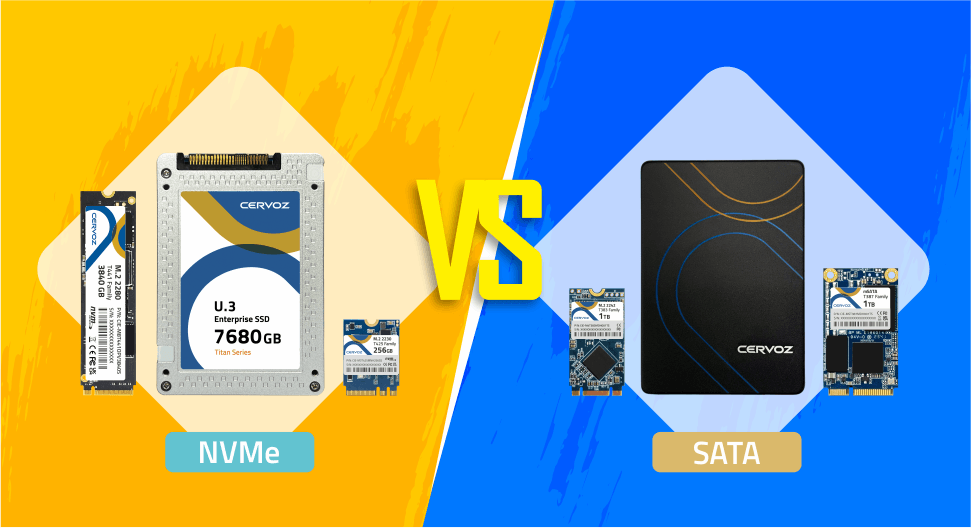
Choosing the right SSD is no longer as simple as picking capacity. Many users face confusion when deciding between NVMe and SATA, especially as both are widely available and often look similar on the surface. The problem is that selecting the wrong type can lead to performance bottlenecks, wasted budget, or underutilized system capabilities.
As modern workloads demand faster data access and better multitasking, understanding how these two technologies differ becomes increasingly important. Here we break down NVMe and SATA SSDs, explain their core differences, and help you determine which option best fits your performance needs, system compatibility, and long-term storage strategy.
Read our guide on different SSD form factors or PCIe SSDs to know more!
To avoid confusion, it is helpful to separate the terms by role. NVMe and AHCI are storage protocols, while PCIe and SATA are connection interfaces. In simple terms, NVMe usually runs over PCIe for high-speed SSDs, while SATA SSDs typically use the AHCI protocol. This is why an SSD's physical shape alone does not always tell you how it communicates with the system.
What is NVMe (Non-Volatile Memory Express)?
NVMe (Non-Volatile Memory Express) is a high-performance storage protocol designed specifically for solid-state drives (SSDs), built to fully leverage the speed of modern flash memory.
Unlike older storage protocols that were originally developed for mechanical hard drives (HDDs), NVMe communicates directly with the CPU through the PCI Express interface, creating a far more efficient data path. This direct connection removes unnecessary bottlenecks and significantly reduces latency, allowing systems to take full advantage of high-speed storage capabilities in both consumer and professional environments.
Unlike older storage protocols that were originally developed for mechanical hard drives (HDDs), NVMe communicates directly with the CPU through the PCI Express interface, creating a far more efficient data path. This direct connection removes unnecessary bottlenecks and significantly reduces latency, allowing systems to take full advantage of high-speed storage capabilities in both consumer and professional environments.
Architecture and How It Works
One of the defining strengths of NVMe lies in its ability to handle massive parallel workloads. While legacy protocols are limited to a single command queue, NVMe supports up to 64,000 queues, each capable of carrying 64,000 commands. This architecture enables the drive to process multiple data requests simultaneously without congestion, which is especially valuable in multitasking scenarios or data-intensive applications.In addition, NVMe uses a streamlined command structure and optimized driver model that relies on polling rather than interrupts, reducing system overhead and improving overall responsiveness.
Form Factors and Compatibility
In terms of physical design, NVMe is most commonly associated with the compact M.2 form factor, making it a popular choice for modern laptops and embedded systems. However, it is also widely available as PCIe add-in cards (AIC) and U.2 drives for enterprise and industrial systems that require higher capacity or durability.What is SATA (Serial ATA)?
SATA (Serial Advanced Technology Attachment) is a widely adopted storage interface introduced in 2003 as a replacement for the older PATA standard. For more than a decade, it has served as the primary connection method for storage devices such as hard disk drives (HDDs) and solid-state drives (SSDs).
Although it was originally designed around the mechanical characteristics of spinning disks, SATA remains highly relevant due to its affordability, stability, and broad compatibility across both older and modern systems.
For legacy systems, SATA controllers can also operate in IDE mode to maintain backward compatibility, although this comes at the cost of reduced performance. In more advanced setups, SATA supports RAID configurations, enabling multiple drives to work together for improved data redundancy or performance.
The interface relies on simple data and power cables, which are easy to install and widely supported across generations of hardware. This makes SATA an ideal choice for upgrading older systems or expanding storage without needing specialized motherboard support.
Although it was originally designed around the mechanical characteristics of spinning disks, SATA remains highly relevant due to its affordability, stability, and broad compatibility across both older and modern systems.
Architecture and How It Works
SATA operates using the Advanced Host Controller Interface (AHCI) protocol, which was optimized for traditional hard drives rather than flash-based storage. AHCI enables features such as hot swapping, allowing drives to be connected or removed without shutting down the system, as well as native command queuing to improve efficiency in handling multiple requests.For legacy systems, SATA controllers can also operate in IDE mode to maintain backward compatibility, although this comes at the cost of reduced performance. In more advanced setups, SATA supports RAID configurations, enabling multiple drives to work together for improved data redundancy or performance.
SATA Form Factors and Compatibility
One of SATA's strongest advantages is its universal compatibility. It is commonly found in the standard 2.5" SSD form factor used in laptops and desktops, as well as in 3.5” hard drives for larger storage systems.The interface relies on simple data and power cables, which are easy to install and widely supported across generations of hardware. This makes SATA an ideal choice for upgrading older systems or expanding storage without needing specialized motherboard support.
NVMe SSD vs SATA SSD: What are the Differences?
Choosing between NVMe and SATA SSDs often comes down to many perspectives. These technologies are built on fundamentally different architectures, which affects everything from speed performance and latency to cost, compatibility, and real-world usability.
SATA III is limited to a theoretical maximum of 6 Gb/s, which translates to roughly 550 MB/s in real-world sequential speeds. NVMe, leveraging PCIe bandwidth, reaches significantly higher throughput, with PCIe 3.0 achieving around 3,500 MB/s, PCIe 4.0 reaching 7,000 MB/s, and PCIe 5.0 exceeding 12,000 MB/s.
Latency also differs greatly, with SATA typically operating at 80 to 100 microseconds, while NVMe ranges from around 25 microseconds down to as low as 5 to 10 microseconds in newer generations.
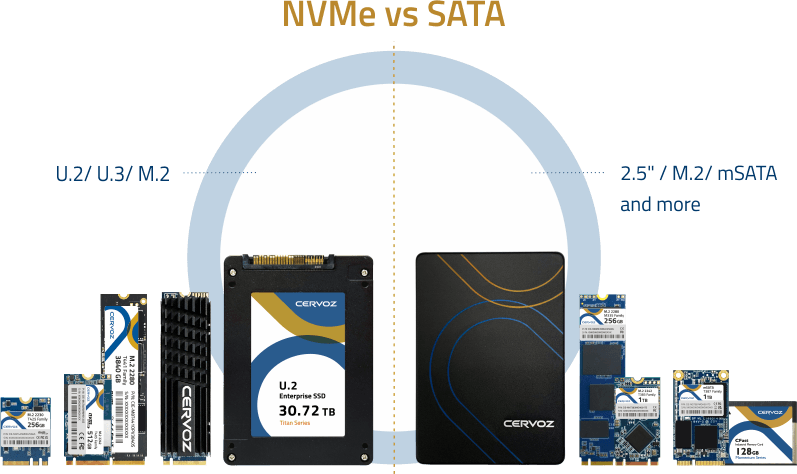
It is important to note that M.2 refers only to the physical form, meaning an M.2 drive can be either SATA or NVMe. NVMe is also available in U.2 drives and PCIe add-in cards (AIC), which are commonly used in enterprise or high-performance computing environments.
You might also be interested in learning about the differences between mSATA and M.2 SSDs!
NVMe drives, due to their higher performance and controller speeds, typically draw between 5 to 8 watts and can reach temperatures of 50 to 70°C under load. High-performance NVMe drives, particularly those using PCIe 4.0 or 5.0, often require heatsinks or active cooling solutions to prevent thermal throttling and maintain consistent performance.
You can also look at the M.2 keying as a quick visual clue. M key slots are commonly used for PCIe/NVMe SSDs and may support up to PCIe x4 lanes. B key and B+M key designs are often associated with SATA-based SSDs or PCIe x2 connections, depending on the device and host system.
However, keying only shows physical compatibility. To confirm actual support, always check the slot label, BIOS settings, or manufacturer specifications.
Speed and Performance
Performance differences between NVMe and SATA are substantial due to their underlying architectures.SATA III is limited to a theoretical maximum of 6 Gb/s, which translates to roughly 550 MB/s in real-world sequential speeds. NVMe, leveraging PCIe bandwidth, reaches significantly higher throughput, with PCIe 3.0 achieving around 3,500 MB/s, PCIe 4.0 reaching 7,000 MB/s, and PCIe 5.0 exceeding 12,000 MB/s.
Latency also differs greatly, with SATA typically operating at 80 to 100 microseconds, while NVMe ranges from around 25 microseconds down to as low as 5 to 10 microseconds in newer generations.
Parallelism
Parallelism further widens the gap. SATA supports only a single command queue with a depth of 32 commands, limiting its ability to handle simultaneous tasks. NVMe supports up to 64,000 queues with 64,000 commands each, enabling it to process millions of input and output operations per second. This makes NVMe significantly more efficient in multitasking and data-intensive environments.Form Factors and Physical Design
Both SATA and NVMe SSDs come in multiple form factors, but their association differs. SATA SSDs are most commonly found in the traditional 2.5" form factor, using separate data and power cables. NVMe is most often associated with the M.2 form factor, which plugs directly into the motherboard, eliminating cables and reducing system clutter.It is important to note that M.2 refers only to the physical form, meaning an M.2 drive can be either SATA or NVMe. NVMe is also available in U.2 drives and PCIe add-in cards (AIC), which are commonly used in enterprise or high-performance computing environments.
You might also be interested in learning about the differences between mSATA and M.2 SSDs!
Power Consumption and Thermal Behavior
Power and thermal characteristics vary significantly between the two technologies. SATA SSDs are generally more energy-efficient, consuming around 2 to 3 watts during active use and operating within a temperature range of approximately 35 to 45°C.NVMe drives, due to their higher performance and controller speeds, typically draw between 5 to 8 watts and can reach temperatures of 50 to 70°C under load. High-performance NVMe drives, particularly those using PCIe 4.0 or 5.0, often require heatsinks or active cooling solutions to prevent thermal throttling and maintain consistent performance.
Cost
From a cost perspective, SATA SSDs remain the more budget-friendly option, especially for higher-capacity storage. NVMe drives typically carry a price premium per gigabyte, although the gap has been narrowing as the technology matures.Scalability
In terms of scalability, NVMe benefits from the evolving PCIe standard, where each new generation increases bandwidth, allowing for continuous performance improvements. SATA, on the other hand, is limited by the SATA III interface of 6 Gb/s and does not scale in the same way.Compatibility
Compatibility is another important consideration. SATA is widely supported across nearly all systems manufactured over the past decade, making it an easy upgrade option. NVMe requires specific hardware support, including M.2 PCIe slots and UEFI firmware. While adapters can enable NVMe drives to be installed in older systems, full functionality, especially boot support, is not always guaranteed.NVMe vs SATA SSD: Comparison
| Factor | NVMe SSD | SATA SSD |
| Interface | Uses PCI Express (PCIe lanes) | Uses SATA interface with cable connection |
| Protocol | NVMe (optimized for flash memory) | AHCI (designed for HDDs) |
| Max Bandwidth | PCIe 3.0: ~3,500 MB/s PCIe 4.0: ~7,000 MB/s PCIe 5.0: 12,000+ MB/s |
SATA III: ~550 MB/s |
| Latency | Very low: ~5 – 25 µs | Higher: ~80 – 100 µs |
| Parallelism | Up to 64,000 queues × 64,000 commands | 1 queue, up to 32 commands |
| Form Factors | M.2, U.2, PCIe add-in cards (AIC) | 2.5" , M.2 (SATA-based), mSATA |
| Power Consumption | ~5 – 8W (higher under load) | ~2 – 3W |
| Thermal Output | Higher, may require heatsinks | Lower, minimal cooling needed |
| Cost | Higher (premium, but decreasing) | Lower (budget-friendly) |
| Scalability | Improves with PCIe generations | Fixed interface, limited scaling |
| Compatibility | Requires M.2 PCIe slot + UEFI support | Widely compatible with most systems |
Which to Choose: NVMe or SATA?
The best choice depends on your system compatibility, performance needs, workload intensity, and budget. NVMe SSDs are the better fit when speed, low latency, and scalability matter most, while SATA SSDs remain practical for cost-sensitive upgrades, general storage, and older hardware.
NVMe is still a good choice for newer laptops and desktops, especially if the price difference is small, but most general users may not fully notice its performance advantage in basic daily use.
SATA SSDs can still work well for game libraries, especially for older games or secondary storage, but NVMe is the better long-term choice for high-performance gaming systems.
SATA SSDs are useful for legacy industrial computers, upgrades for existing drive bays, budget-sensitive deployments, and applications that prioritize stable storage over maximum speed.
NVMe SSDs are better suited for edge AI, machine vision, automation, transportation, data logging, and other demanding industrial workloads that require fast access, high endurance, and low latency.
General Users
For everyday tasks such as web browsing, office work, online meetings, and media playback, a SATA SSD is usually enough. It already delivers a major improvement over traditional HDDs and keeps costs low.NVMe is still a good choice for newer laptops and desktops, especially if the price difference is small, but most general users may not fully notice its performance advantage in basic daily use.
Gamers
NVMe is the stronger option for gaming, especially for modern titles with large game worlds, frequent loading screens, and advanced storage technologies. It helps reduce load times and supports smoother asset streaming.SATA SSDs can still work well for game libraries, especially for older games or secondary storage, but NVMe is the better long-term choice for high-performance gaming systems.
Content Creators
For light photo editing, audio production, and standard video editing, SATA SSDs can be a cost-effective option. However, NVMe is recommended for heavier creative workflows, including 4K/8K video editing, large RAW photo libraries, 3D rendering, animation, and real-time project editing. Its higher bandwidth and lower latency help speed up file transfers, project loading, cache handling, and export workflows.Industrial and Embedded Systems
Both NVMe and SATA can be suitable for industrial and embedded applications, depending on the system design.SATA SSDs are useful for legacy industrial computers, upgrades for existing drive bays, budget-sensitive deployments, and applications that prioritize stable storage over maximum speed.
NVMe SSDs are better suited for edge AI, machine vision, automation, transportation, data logging, and other demanding industrial workloads that require fast access, high endurance, and low latency.
Enterprise and Data Center Workloads
For enterprise environments, NVMe is generally the preferred choice for high-performance databases, virtualization, cloud infrastructure, AI training, high-performance computing (HPC), and data center storage. Its scalability, parallelism, and PCIe-based bandwidth make it ideal for workloads with heavy read/write demands. SATA SSDs may still be used for archival storage, backup systems, cold data, or lower-cost server storage where the balance of capacity and budget is more important than peak performance.FAQs
Is NVMe faster than SATA?
Yes. NVMe is much faster than SATA because it uses the PCIe interface and was designed for flash memory. SATA SSDs usually top out around 550 MB/s, while NVMe SSDs can reach several thousand MB/s depending on the PCIe generation.How to tell if my M.2 slot is SATA or NVMe?
Check your motherboard or laptop manual first. An M.2 slot may support SATA, PCIe/NVMe, or both, so a drive that physically fits does not always mean it will work.You can also look at the M.2 keying as a quick visual clue. M key slots are commonly used for PCIe/NVMe SSDs and may support up to PCIe x4 lanes. B key and B+M key designs are often associated with SATA-based SSDs or PCIe x2 connections, depending on the device and host system.
However, keying only shows physical compatibility. To confirm actual support, always check the slot label, BIOS settings, or manufacturer specifications.
Do I need NVMe for everyday use?
Not always. For web browsing, office work, video streaming, and basic file storage, a SATA SSD is usually enough. NVMe is better for users who want faster boot times, quicker transfers, and stronger performance for multitasking or heavier workloads.Is NVMe more expensive than SATA?
Generally, yes. NVMe SSDs usually cost more per gigabyte because they use faster controllers, PCIe connectivity, and higher-performance designs. However, the price gap has become much smaller, making NVMe a practical choice for many modern systems.Which is more reliable, NVMe or SATA?
Reliability depends more on NAND quality, controller design, endurance rating, firmware, and operating conditions than on whether the SSD is NVMe or SATA. While NVMe offers higher performance, and SATA often runs cooler, industrial applications should also consider features such as wide temperature support and Power Loss Protection. In unstable power environments, these technologies can matter more than raw read/write speed.Is NVMe backward compatible with SATA slots?
No. NVMe is not backward compatible with SATA slots because they use different protocols and interfaces. A SATA slot cannot run an NVMe SSD, even if the drive looks similar in M.2 form. However, some M.2 slots support both SATA and PCIe/NVMe, so you should always check the motherboard or laptop specifications before upgrading.Cervoz Offers Industrial M.2 SSDs for Diverse Storage Needs
Choosing between NVMe and SATA ultimately depends on performance needs, system compatibility, and long-term scalability. For industrial environments where speed, reliability, and endurance are critical, NVMe stands out as the preferred solution.
As a trusted industrial storage supplier, Cervoz offers industrial M.2 NVMe and M.2 SATA SSDs designed for embedded systems, automation, and mission-critical environments. With strict quality control and extended lifecycle support, we help ensure stable storage performance across demanding applications. Contact us today to find the right industrial SSD solution for your system.
As a trusted industrial storage supplier, Cervoz offers industrial M.2 NVMe and M.2 SATA SSDs designed for embedded systems, automation, and mission-critical environments. With strict quality control and extended lifecycle support, we help ensure stable storage performance across demanding applications. Contact us today to find the right industrial SSD solution for your system.
