
- Company
- Press Center
- What are the Differences Between mSATA and M.2 SSD: Full Guide
BLOG
2026.06.15
What are the Differences Between mSATA and M.2 SSD: Full Guide
SHARE
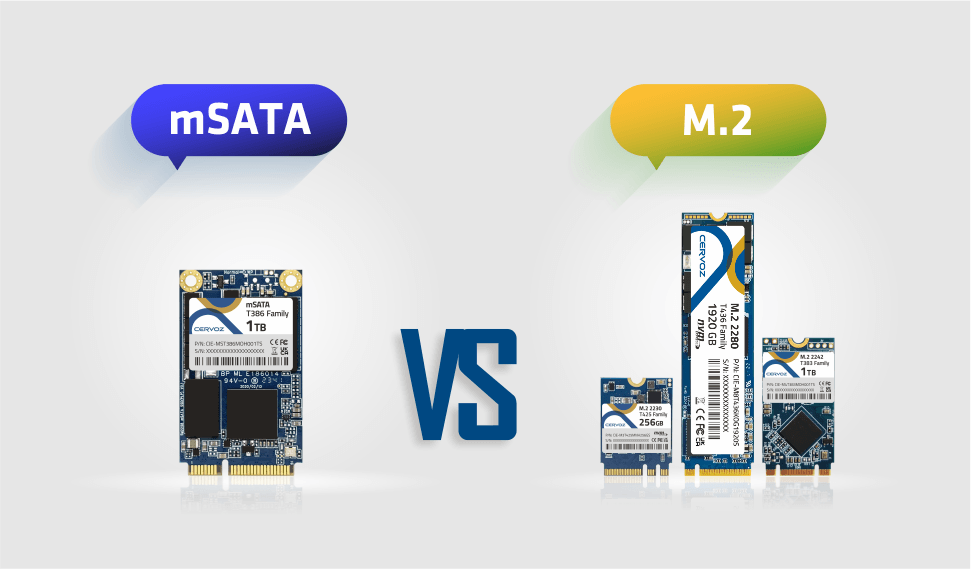
Choosing the right SSD can be challenging, especially when comparing mSATA and M.2 form factors. While both are compact storage solutions, their differences in design, interface, and performance often lead to confusion and compatibility issues.
In this guide, we will provide a clear comparison of mSATA and M.2 SSDs, helping you understand their key differences and choose the right option for your needs.
What is mSATA?
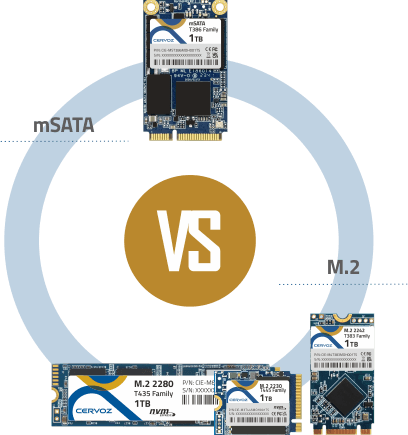
mSATA, short for mini-SATA, is a compact SSD solution built around the mSATA form factor, designed for systems where space efficiency is critical. Unlike traditional 2.5" drives, mSATA SSDs use a bare circuit board design that mounts directly onto the motherboard, making them well-suited for ultrabooks, embedded systems, and other space-constrained devices.In terms of mSATA sizes, the format is largely standardized for compatibility, while remaining significantly smaller than conventional drives, at roughly one-eighth the size of a 2.5" SATA SSD. Its footprint is often compared to that of one-third the size of a business card, highlighting its compact and space-saving design.
Technically, mSATA operates entirely on the SATA interface, which defines its capabilities and limitations. Because it does not support PCIe, its performance is restricted to the SATA III bandwidth ceiling of 6Gb/s, or approximately 600 MB/s.
From a hardware perspective, mSATA SSDs connect through an mSATA slot, which resembles a mini-PCIe connector in appearance. However, despite the similar physical design, the electrical signaling is different, meaning only a dedicated mSATA slot can properly support these drives.
While its presence in consumer devices has declined, mSATA remains relevant in industrial and legacy environments where compatibility and long-term availability are essential.
What is M.2?
M.2, formerly known as Next Generation Form Factor (NGFF), is a modern storage interface built around the slim and flexible M.2 form factor, designed to support both compact devices and high-performance systems. Beyond SSDs, M.2 can also be used for components such as Wi-Fi and Bluetooth modules.One of the defining characteristics of M.2 is its support for multiple interfaces and protocols, such as SATA and PCIe. M.2 SATA SSDs operate using the same SATA III interface as traditional drives, which limits their performance to around 600 MB/s. In contrast, M.2 NVMe (PCIe) SSDs leverage the PCIe interface and NVMe protocol to communicate directly with the CPU, enabling significantly higher speeds and lower latency. Depending on the PCIe generation, these drives can achieve data transfer rates measured in several gigabytes per second, making them suitable for demanding workloads.
When it comes to M.2 lengths, the standard defines multiple module sizes while maintaining a consistent width of 22mm. These are identified using numerical codes such as 2230, 2242, 2260, 2280, and 22110, where the numbers indicate the width and length in millimeters. Among these, 2280 is the most common size in standard computing platforms, while longer modules are typically used for higher-capacity or enterprise storage.
To ensure compatibility, M.2 uses a keying system based on notch positions in the connector. Variants such as M key, B key, and B+M key determine the supported interface and bandwidth. For example, M key is commonly used for high-speed NVMe PCIe x4 SSDs, while B key and B+M key drives may support SATA or up to PCIe x2, depending on the SSD and host slot. Other key types, such as A and E, are reserved for wireless communication modules.
Beyond performance, the M.2 design offers several practical advantages. Its compact size, often compared to a stick of gum, allows for highly space-efficient system designs. The direct motherboard connection eliminates the need for additional power or data cables, simplifying installation and improving airflow. Finally, its support for evolving PCIe generations ensures long-term scalability, allowing systems to benefit from continuous improvements in storage performance.
mSATA vs M.2 SATA vs M.2 NVMe (PCIe): Full Comparison
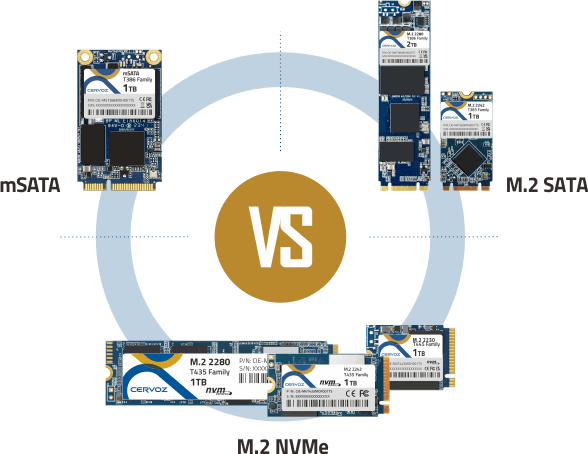
Although mSATA, M.2 SATA, and M.2 NVMe are all compact SSD solutions, they differ greatly in interface support, performance potential, physical design, and compatibility. M.2 is widely recognized as the modern successor to mSATA. It was developed to address the maximum read/write speed limitations of mSATA. Here we will take a closer look at the differences among mSATA and the two types of M.2 (SATA and NVMe).
Quick clarification:
mSATA and M.2 are SSD form factors, meaning they describe the physical shape and connector design. SATA and PCIe are interfaces used for data transfer, while AHCI and NVMe are communication protocols. In simple terms, mSATA uses SATA with AHCI, M.2 SATA also uses SATA with AHCI, and M.2 NVMe uses PCIe with NVMe for much higher performance.
Interface and Protocol Support
mSATA is limited to the SATA interface, so it cannot use PCIe lanes or NVMe communication. M.2 SATA also uses the SATA interface, which means it shares the same basic performance limitation as mSATA. M.2 NVMe, however, uses the PCIe interface with the NVMe protocol, allowing faster communication between the SSD and the CPU.Performance and Speed
mSATA and M.2 SATA offer similar speed because both are restricted by SATA III bandwidth, with a maximum theoretical speed of about 6Gb/s, or roughly 600 MB/s. M.2 NVMe provides a much higher performance ceiling, reaching several gigabytes per second depending on the PCIe generation, making it better suited for gaming, content creation, AI workloads, and high-speed data processing.Physical Dimensions and Form Factors
mSATA generally follows one standardized size. M.2 SATA and M.2 NVMe use the same M.2 form factor family, which supports multiple lengths such as 2230, 2242, 2260, 2280, and 22110. This gives M.2 drives more flexibility across compact laptops, industrial systems, desktops, and enterprise storage designs.Connectors and Keying
mSATA uses a mini-PCIe-style connector, but it requires a dedicated mSATA slot because it is not electrically compatible with standard mini-PCIe ports. M.2 SATA commonly uses B key or B+M key configurations, while M.2 NVMe typically uses an M key connector to support PCIe x4 bandwidth. Because of these differences, the three formats should always be checked against the motherboard or system specification before installation.mSATA vs M.2: Summary
| Feature | mSATA | M.2 SATA | M.2 NVMe |
| Interface | SATA | SATA | PCIe |
| Protocol | AHCI/SATA | AHCI/SATA | NVMe |
| Max Bandwidth | ~600 MB/s | ~600 MB/s | Several GB/s |
| Form Factor | Fixed mSATA form factor | M.2 form factor | M.2 form factor |
| Common Sizes | Single standard size | 2230, 2242, 2260, 2280, 22110 | 2230, 2242, 2260, 2280, 22110 |
| Connector | mini-PCIe-style mSATA slot | M.2 B key or B+M key | M.2 M key |
Read our guide here if you want to know more about different SSD form factors.
How to Choose Between mSATA and M.2?
Selecting between mSATA, M.2 SATA, and M.2 NVMe depends primarily on your system compatibility, performance requirements, and budget. Rather than focusing on form factor alone, it is important to evaluate how your motherboard supports storage interfaces and what level of performance your application actually requires.Check Motherboard Compatibility First
The first step is to identify what your system supports. If your device only includes an mSATA slot, then mSATA is your only direct upgrade option. For newer systems, check whether the M.2 slot supports SATA, PCIe (NVMe), or both, as some M.2 slots are limited to a single protocol. Physical fit is also important, as M.2 slots support specific lengths such as 2280 or 2242.Define Your Performance Needs
Your workload should guide your choice. If you are upgrading a system for basic tasks such as web browsing, office work, or light applications, SATA-based solutions are generally sufficient. However, for demanding workloads like gaming, virtualization, edge computing or AI processing, NVMe SSDs offer significantly faster data transfer speeds and lower latency, resulting in noticeably improved system responsiveness.Consider Budget and Value
Cost is another key factor. mSATA and M.2 SATA SSDs are typically more affordable and provide stable performance for everyday use. M.2 NVMe SSDs, while more expensive, deliver a much higher performance ceiling. For many users, the decision comes down to whether the performance gain justifies the additional cost.Taking all factors into account:
-
mSATA remains a reliable solution for upgrading older laptops, embedded platforms, and industrial systems where only legacy interfaces are available, helping extend device lifespan with stable SATA performance.
-
M.2 SATA serves as a cost-effective option for newer systems that support the M.2 form factor but do not require high-speed storage, making it suitable for general computing and budget-conscious upgrades.
-
M.2 NVMe is the preferred standard for modern applications, delivering the performance needed for gaming, edge computing, AI processing, and enterprise workloads, where speed, low latency, and scalability are critical.
A bit confused about what is NVMe and what is SATA? Check out our guide here!
