
- Company
- Press Center
- RDIMM vs. UDIMM: What are the Differences?
BLOG
2026.06.12
RDIMM vs. UDIMM: What are the Differences?
SHARE
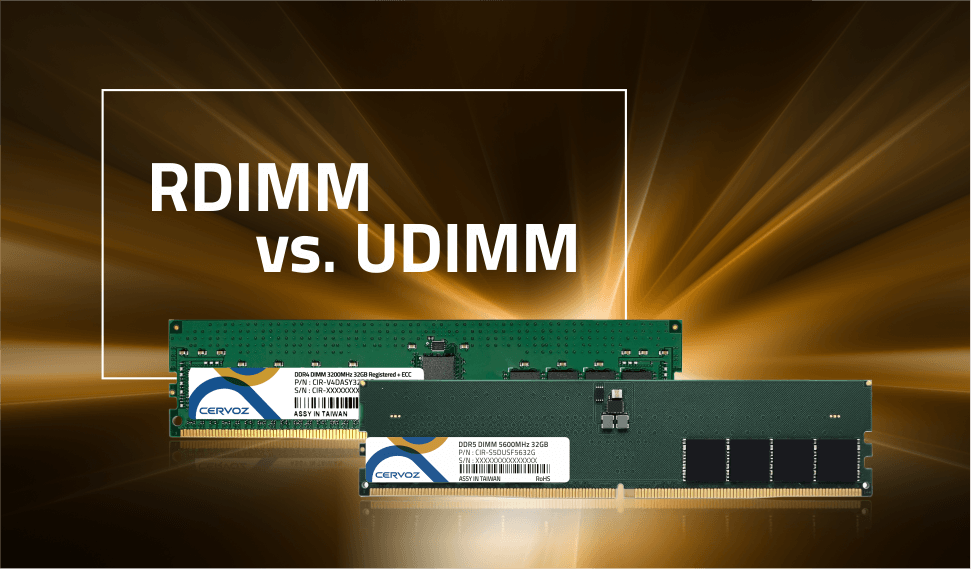
When upgrading a computer or configuring a server quickly, many people would encounter unfamiliar memory terms like DIMM, UDIMM, and RDIMM. Without understanding the difference between RDIMM and UDIMM, choosing the right memory can be confusing and may lead to compatibility or performance issues. In this article, we will explain what DIMM, UDIMM, and RDIMM are, how they differ, and how each type is used in modern computing systems so you can make a more informed hardware decision. Let's get started!
What are DIMM, UDIMM, and RDIMM?
A DIMM (Dual In-line Memory Module) is the standard physical memory module used in modern computers. It consists of a rectangular printed circuit board populated with DRAM (Dynamic Random-Access Memory) chips that store data temporarily while the system is running.The term dual inline refers to the electrical design of the module: pins on both sides of the board connect to separate circuits, enabling a 64-bit data path (or 72-bit when ECC is used to ensure data integrity). This design doubled the data width of older SIMM (Single In-line Memory Module). In practice, DIMMs serve as the computer’s primary working memory, allowing the CPU to rapidly access data needed for real-time processing.
UDIMM (Unbuffered DIMM)
In UDIMM design, there is no buffer or register between the CPU's memory controller and the DRAM chips on the module. The memory controller communicates directly with the memory chips, allowing signals to travel without intermediary processing. This direct communication path results in low memory latency, which benefits everyday computing tasks and typical workloads.However, because the controller must handle all electrical signaling itself, the load increases as more modules are installed. This limitation restricts how many modules can be used on a single memory channel, typically one or two UDIMMs per channel, which also caps the maximum system memory capacity.
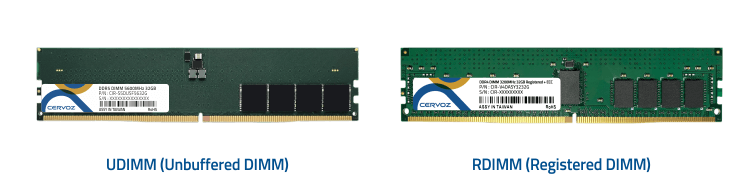
UDIMM and RDIMM
RDIMM (Registered DIMM)
Unlike UDIMMs, RDIMMs include a register (often called a Registered Clock Driver, or RCD) positioned between the memory controller and the DRAM chips. This register receives command and address signals from the CPU, temporarily buffers them, and then retransmits them to the memory chips.By buffering these signals, the register reduces the electrical load on the memory controller and therefore improves signal integrity. This allows systems to support more memory modules per channel and significantly higher total memory capacity.
Other DIMMs
-
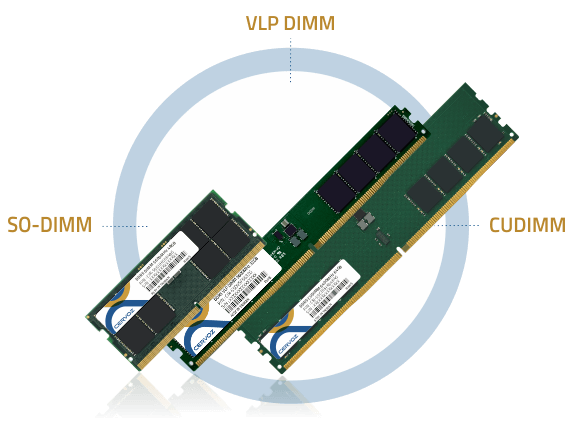
LRDIMM (Load-Reduced DIMM): LRDIMMs are designed for systems that require extremely high memory capacity, such as virtualization platforms and high-performance computing clusters. They use an isolation Memory Buffer (iMB) or similar buffering component to manage data, command, and address signals before reaching the DRAM chips. By significantly reducing the electrical load on the memory controller, LRDIMMs can support more memory ranks per module, allowing servers to achieve much higher overall memory density.
-
SO-DIMM (Small Outline DIMM): SODIMMs are compact memory modules commonly used in laptops, mini PCs, and small form-factor desktops. They are roughly half the size of standard DIMMs, enabling them to fit in space-limited devices. Pin counts vary depending on the memory generation, such as 260 pins for DDR4 and 262 pins for DDR5.
-
CUDIMM (Clocked Unbuffered DIMM): CUDIMM is a newer module type designed for the DDR5 memory generation. These modules integrate a Clock Driver (CKD) that regenerates and stabilizes the clock signal, helping memory operate at much higher speeds. This design supports advanced workloads such as AI computing and large-scale data processing, where higher memory frequencies can significantly improve system performance.
-
CSODIMM (Clocked Small Outline DIMM): CSODIMMs are the small form-factor counterpart to CUDIMMs, designed for laptops, compact PCs, and embedded systems using DDR5 memory. Like CUDIMMs, they include a Clock Driver (CKD) that regenerates and stabilizes the clock signal, improving signal integrity and enabling stable operation at higher memory frequencies in space-constrained systems.
-
NVDIMM (Non-Volatile DIMM): NVDIMMs combine DRAM, NAND flash, and a controller to create a hybrid memory solution. During normal operation, they behave like standard DRAM modules. If a power outage occurs, an onboard supercapacitor provides enough power to transfer the data from DRAM into the non-volatile NAND flash, preventing data loss in mission-critical industrial applications.
-
VLP-DIMM (Very Low Profile DIMM): VLP-DIMMs are built with a shorter module height than standard DIMMs. They are commonly used in blade servers or densely packed systems where vertical space inside the chassis is limited.
-
Mini-DIMM (Miniature DIMM): Mini-DIMMs are smaller than SODIMMs and are typically found in embedded devices and single-board computers, where extremely compact hardware designs are required.
Key Differences Between RDIMM and UDIMM
Although RDIMM and UDIMM share the same DIMM form factor, they behave very differently once installed in a system. To better understand these differences between RDIMM and UDIMM, the comparison we mention below highlights the most important technical factors:Performance
One key difference between RDIMM and UDIMM is memory latency.UDIMMs typically provide slightly lower latency because the CPU communicates directly with the memory chips. With fewer components involved in the signal path, data can be accessed marginally faster. This makes UDIMMs well-suited for applications where quick response times are beneficial.
RDIMMs, on the other hand, introduce a small latency increase, usually around one additional clock cycle. While this adds a minor delay, the impact is typically negligible in most server environments. In exchange, RDIMMs deliver more stable performance under heavy workloads, which becomes increasingly important when large memory configurations are used.
Capacity
Another major difference between RDIMM and UDIMM is the maximum memory capacity a system can support.Systems using UDIMMs are generally limited in how much memory they can install. Most platforms allow two DIMMs per memory channel, which restricts the overall memory capacity of the system. This limitation is acceptable for workstations that rarely require extremely large memory pools.
RDIMMs are designed to support significantly larger memory configurations. Because they reduce the electrical load on the memory controller, servers can support more modules per channel and higher-density modules overall. This enables business systems to reach very large memory capacities, often measured in terabytes, which is essential for workloads such as virtualization and high-performance computing.
Reliability
Reliability is another key factor that distinguishes RDIMM from UDIMM, especially in systems where large amounts of memory must operate continuously under heavy workloads.RDIMMs provide stronger electrical stability. Because these modules include a hardware register, command and address signals are buffered before reaching the DRAM chips. This buffering reduces the electrical load placed on the CPU's memory controller, which helps maintain cleaner signal timing across multiple modules.
As memory capacity increases, maintaining signal integrity becomes increasingly difficult. In high-density server configurations with several populated memory channels, the register in RDIMMs helps preserve stable communication between the CPU and the memory modules. This design improves overall system reliability and operational consistency, which is critical for running 24/7 workloads.
UDIMMs rely on direct communication with the memory controller, which works well in smaller memory configurations. However, as more modules are installed, the electrical load increases, and signal quality can degrade. For this reason, UDIMM systems typically operate with fewer modules and lower overall memory density to maintain stability.
Compatibility
RDIMM and UDIMM modules are designed for different system architectures, which means they are not interchangeable.Most platforms support only one type of memory module, and mixing RDIMM and UDIMM in the same system will usually prevent the computer from booting. During the power-on self-test (POST), the motherboard firmware typically detects incompatible configurations and stops the system from starting.
Modern memory platforms also help prevent installation mistakes through physical keying. In DDR5 memory (We will explain about this later), RDIMMs and UDIMMs have different notch positions, ensuring that incompatible modules cannot be inserted into the wrong slot.
Compatibility also depends heavily on the processor platform. Enterprise processors are designed to support RDIMMs because server workloads require larger memory capacity and stronger signal stability. In contrast, consumer processors typically use UDIMMs, prioritizing lower cost and lower latency for daily computing purposes.
Applications
Based on their architectural differences and the technical comparisons above, it becomes clear that RDIMM and UDIMM modules are designed for different types of computing systems.UDIMMs are primarily used in consumer and entry-level systems. They are the standard memory modules found in desktop PCs, laptops, and entry-level workstations. These systems usually prioritize cost efficiency, low latency, and moderate memory capacity, making UDIMMs well-suited for workloads such as gaming, multimedia editing, general productivity, and everyday office applications.
RDIMMs are purpose-built for enterprise and professional environments. They are widely used in servers, data centers, and high-performance workstations where large memory capacity and stable operation are essential. Typical workloads include virtualization platforms running multiple virtual machines, AI and machine learning training environments, in-memory databases, and high-performance computing (HPC) systems that must process massive datasets reliably.
RDIMM vs UDIMM: Summary
| Factor | UDIMM (Unbuffered DIMM) | RDIMM (Registered DIMM) |
| Architecture | Direct connection between the CPU memory controller and DRAM chips; no buffer or register | Includes a register (RCD) that buffers command and address signals between the controller and DRAM |
| Performance | Lower latency due to direct communication with memory chips | Slightly higher latency (typically one extra clock cycle) due to signal buffering |
| Capacity | Lower overall capacity; typically limited to two DIMMs per channel | Supports higher memory density and more DIMMs per channel |
| Reliability | Increased electrical load as more modules are added, which may reduce signal stability | Reduced electrical load on the memory controller, improving signal integrity and stability |
| Compatibility | Used in consumer-grade systems such as desktops and laptops | Designed for server platforms and enterprise workstations |
| Typical Applications | Gaming PCs, personal computers, entry-level workstations, edge computing & retail, and fanless IPC | Servers, data centers, virtualization platforms, AI workloads, HPC systems, and advanced industrial environments |
RDIMM vs UDIMM: ECC and DDR Explained
When comparing memory modules, you will often see terms such as ECC and DDR mentioned alongside UDIMM and RDIMM. This is because memory modules are typically described using two dimensions: the DIMM architecture (such as UDIMM or RDIMM) and the memory technology standard (such as DDR4 or DDR5).In addition, reliability features like ECC (Error Correcting Code) are frequently associated with certain DIMM types, particularly in server and workstation environments. Understanding what ECC and DDR mean helps clarify how memory modules are classified and why certain combinations are used in specific computing systems.
What Is ECC?
ECC (Error Correcting Code) is designed to detect and correct data corruption that occurs during memory operations. In standard memory modules, small errors such as bit flips may occur due to electrical interference, radiation, or signal noise. While rare, these errors can cause system crashes, incorrect calculations, or silent data corruption. ECC memory helps prevent these problems by automatically identifying and correcting certain types of errors.In the DDR5 generation, ECC exists at two different levels of protection: On-die ECC and Side-band ECC.
DDR5 DRAM chips include on-die ECC as a built-in feature. This mechanism corrects small errors that occur inside the DRAM chip itself. As memory density increases and cells become smaller, the risk of internal bit errors also rises. On-die ECC helps maintain manufacturing yield and chip reliability by fixing these internal errors automatically. However, on-die ECC only protects the memory chip internally. It does not correct errors that occur while data travels between the memory module and the CPU.
Side-band ECC, often called rank-level, provides end-to-end error protection. These modules include an extra data path, typically expanding the memory bus from 64 bits to 72 bits or 80 bits. The additional bits store error-checking information that allows the system to detect and correct single-bit errors and identify multi-bit errors during data transmission between the memory module and the CPU. Because this protection covers both the DRAM chips and the data transfer process, side-band ECC provides a much higher level of system reliability.
ECC in UDIMM vs RDIMM
ECC can be implemented in both UDIMM and RDIMM modules, but the level of protection varies depending on the module type.Most consumer DDR5 UDIMMs include on-die ECC only, meaning error correction occurs within the DRAM chips but not across the entire memory system. Some workstation platforms support ECC UDIMMs, which include additional DRAM chips to provide full side-band ECC protection.
RDIMMs are commonly used in servers and enterprise systems and almost include traditional side-band ECC. Combined with the signal-buffering register used in RDIMMs, this configuration provides very high reliability and stable memory operation, which is essential for mission-critical workloads.
| Feature | DDR5 UDIMM (Consumer) | ECC UDIMM (Workstation) | RDIMM (Server) |
| On-die ECC | Yes (standard in DDR5) | Yes | Yes |
| Side-band ECC | No | Yes | Yes |
| Protection Scope | Internal DRAM chip only | End-to-end protection for the CPU | End-to-end protection with signal buffering |
| Reliability Level | Standard | High | Highest |
What Is DDR?
DDR (Double Data Rate) is a type of memory technology that increases performance by transferring data twice per clock cycle. Unlike earlier SDR (Single Data Rate) technologies that send data once per cycle, DDR memory transmits data on both the rising and falling edges of the clock signal, effectively doubling the data transfer rate without increasing the base clock frequency.It is important to distinguish between DDR generation and DIMM type, as they describe different aspects of memory technology.
-
DDR Generation (DDR3, DDR4, DDR5): This refers to the underlying memory standard, which determines speed, voltage, bandwidth, and architectural improvements. For example, DDR5 provides higher bandwidth and improved efficiency compared with DDR4.
-
DIMM Type (UDIMM, RDIMM, LRDIMM): This refers to the module architecture and signal handling design used to connect the memory module to the CPU’s memory controller.
Each DDR generation typically supports multiple DIMM types. For instance, both DDR4 and DDR5 platforms can use UDIMM or RDIMM, depending on the motherboard and processor design. However, these modules are not interchangeable, and in modern DDR5 platforms, they are often physically keyed differently to prevent incorrect installation.
FAQs
Can RDIMM and UDIMM be used together in the same system?
No. RDIMM and UDIMM cannot be mixed in the same system. They use different electrical architectures and are designed for different platforms. Attempting to install both types together typically causes the system to fail during boot or trigger an invalid memory configuration error during POST.Is RDIMM faster than UDIMM?
Not necessarily. UDIMM usually has slightly lower latency because it connects directly to the CPU’s memory controller. RDIMM adds a small delay due to its register buffer. However, RDIMM often delivers more stable performance in servers with large memory capacities and heavy workloads.What is the main advantage of RDIMM?
The main advantage of RDIMM is its ability to support much larger memory capacities while maintaining system stability. The built-in register reduces the electrical load on the memory controller, allowing servers to support more DIMMs per channel and achieve high memory densities.Is ECC memory the same as RDIMM?
No. ECC refers to error-correction technology, while RDIMM refers to a specific DIMM architecture that uses a register to buffer signals. Some RDIMM modules include ECC, but ECC memory can also exist in other forms, such as ECC UDIMMs used in certain workstation platforms.What is RDIMM used for?
RDIMM is used in enterprise servers and high-performance workstations that require large memory capacity and stable operation. It is commonly applied in virtualization, cloud computing, AI workloads, in-memory databases, and high-performance computing or advanced industrial environments where reliability, scalability, and consistent performance are critical.What is the difference between ECC UDIMM and RDIMM?
ECC UDIMMs provide system-level error correction using additional DRAM chips but still communicate directly with the CPU’s memory controller. RDIMMs include both ECC capability and a register buffer that improves signal integrity, allowing servers to support more modules and higher memory capacity.Do desktop computers use RDIMM or UDIMM?
Most desktop computers use UDIMM. Consumer processors such as Intel Core and AMD Ryzen are designed for UDIMMs because they prioritize lower cost and lower latency. RDIMMs are generally reserved for enterprise servers and high-performance workstations that require large memory capacity.What does DDR mean in RDIMM or UDIMM?
DDR stands for Double Data Rate, a memory technology that transfers data twice per clock cycle by using both the rising and falling edges of the clock signal. DDR generations such as DDR4 and DDR5 define speed and voltage standards, independent of whether the module is UDIMM or RDIMM.Discover High-Performance DIMM for Industrial Systems at Cervoz
Selecting the right memory architecture is critical for building reliable and scalable computing systems. As discussed in this article, understanding the difference between RDIMM and UDIMM helps industrial computer manufacturers, system integrators, and end users choose memory that matches their performance, capacity, and stability requirements. From embedded platforms to enterprise-grade servers, the right DIMM solution ensures consistent system operation in demanding environments.Cervoz provides industrial-grade DIMMs designed for long-term reliability, wide platform compatibility, and stable performance in mission-critical applications. Contact us today to know more or explore our memory solutions to equip your systems with dependable, high-quality DIMMs built for industrial computing.
